Classic modes
Martin 1, Martin 2, Scottie 1, Scottie 2, Scottie DX and the traditional black-and-white modes.
Simple, safe and automatic SSTV reception for shortwave listeners and radio amateurs.
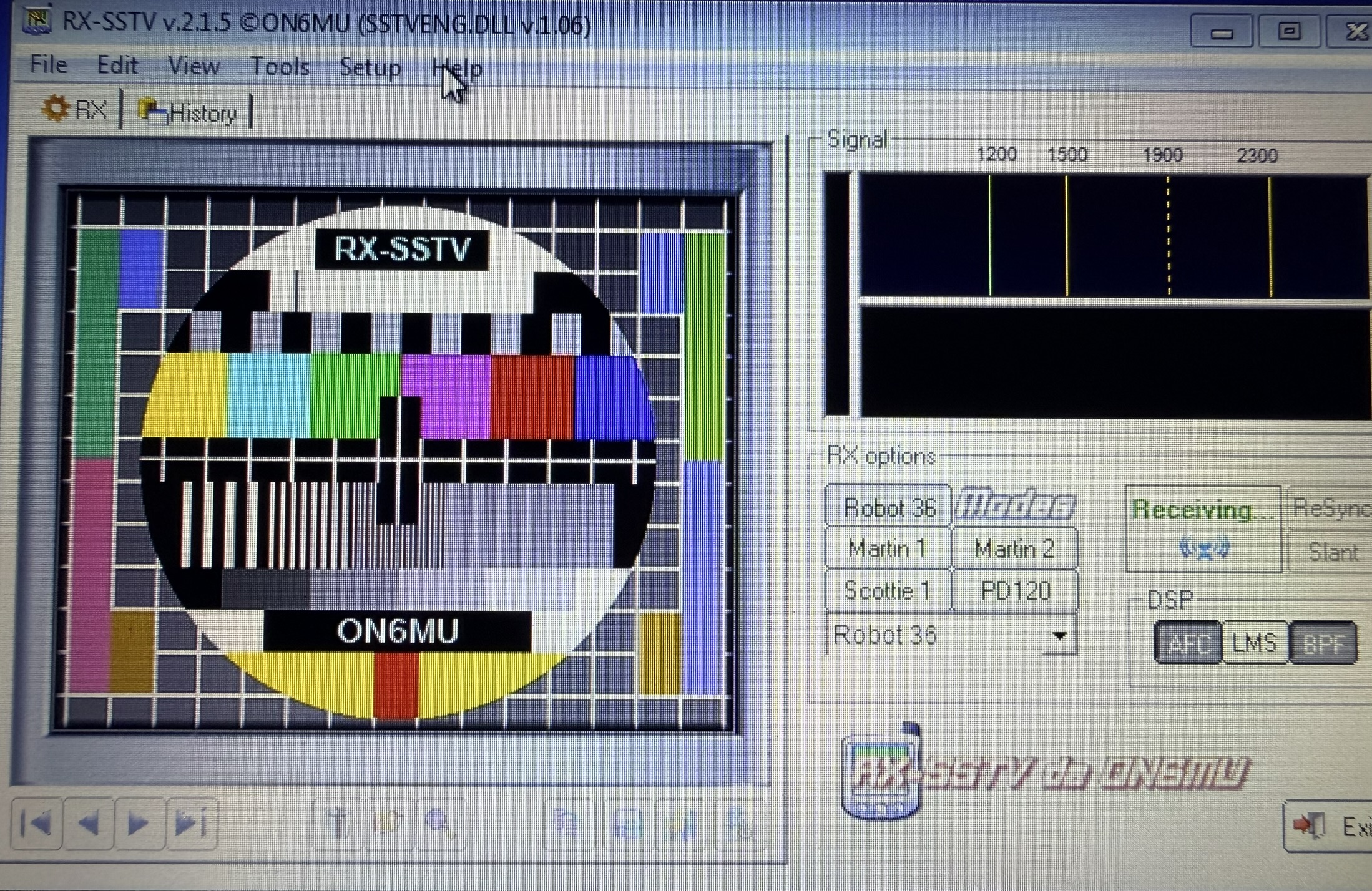
RX-SSTV is a receive-only Slow Scan Television program developed by Belgian radio amateur Guy Roels, ON6MU. It was designed as an easy, back-to-basics solution for shortwave listeners, radio amateurs and anyone who simply wants to monitor SSTV signals.
Unlike many traditional SSTV programs, RX-SSTV contains no transmit section. There are no PTT controls, transmitter interfaces or COM-port settings to configure.
This makes it especially suitable for listeners, beginners and young radio enthusiasts who want to discover SSTV without the risk of accidentally activating a transmitter.
RX-SSTV was created specifically for people who want to receive and decode SSTV pictures but do not require a transmit function.
Connect the audio output of a receiver to the computer’s sound input, tune to an active SSTV frequency and let the software detect the transmission.
At the heart of RX-SSTV is the powerful SSTV engine originally developed for MMSSTV by Makoto Mori, JE3HHT.
This gives RX-SSTV reliable automatic mode detection and support for a large collection of analogue SSTV modes. The program can recognise an incoming VIS signal, select the corresponding mode and begin decoding automatically.
RX-SSTV provides the simple receive-only interface, while the decoding technology comes from the respected MMSSTV engine.
RX-SSTV supports 37 different modes through the MMSSTV engine, including many of the modes commonly heard on HF, VHF, UHF and during special transmissions from the International Space Station.
Martin 1, Martin 2, Scottie 1, Scottie 2, Scottie DX and the traditional black-and-white modes.
Robot 24, Robot 36 and Robot 72. Robot 36 has long been a popular mode for receiving SSTV from space.
PD-50 through PD-290, including PD120, which has been widely used for ISS SSTV events.
AVT 90, SC2 modes, P3, P5, P7, MP, MR and ML mode families.
One of the most useful features of RX-SSTV is its ability to work almost entirely automatically.
The program listens for the SSTV VIS signal and automatically selects a supported mode when a transmission begins.
Received pictures can automatically be stored in the History folder using filenames containing the reception date and time.
Pictures may be saved as space-saving JPG files or as larger BMP files for maximum image quality.
The History section acts as a permanent reception archive. Pictures may be viewed, copied, renamed, edited or deleted.
Some SSTV stations include an FSK-ID at the end of a transmission. This short digital signal can contain the sender’s callsign.
RX-SSTV can decode and record these identifiers. The received callsign may be added to the image filename, included in the image stamp and written to an FSK-ID log together with the reception date and time.
2026-08-05_14.23.18_PD0RBX.jpg
RX-SSTV is particularly suitable for receiving special SSTV transmissions from the International Space Station.
The program can automatically detect the transmitted mode and save the received image, helping listeners avoid missing pictures during a busy ISS SSTV event.
Read the ISS SSTV GuideSSTV signals are not always received under perfect conditions. Noise, interference, Doppler shift and soundcard timing errors can affect the resulting picture.
Automatic Frequency Control helps the decoder follow small frequency changes in the received synchronisation signal.
The LMS filtering option can help reduce noise and improve rejection of interfering tones.
Different band-pass filter strengths can be used to concentrate on the audio frequencies required for SSTV decoding.
Automatic slant correction can compensate for small soundcard clock differences that otherwise cause pictures to lean sideways.
RX-SSTV receives its audio through the computer soundcard. The receiver’s audio output is connected to the computer’s line input or microphone input.
A direct cable may work, but an isolated sound interface is safer and helps prevent unwanted electrical connections, ground loops and noise between the receiver and computer.
A listening-only setup can be very simple:
| Band | Frequency | Mode |
|---|---|---|
| 80 metres | 3.730 MHz in Europe | LSB |
| 40 metres | 7.043 MHz in Europe | LSB |
| 20 metres | 14.230 MHz | USB |
| 15 metres | 21.340 MHz | USB |
| 10 metres | 28.680 MHz | USB |
| 2 metres | 144.500 MHz | FM |
| ISS downlink | 145.800 MHz | FM receive only |
Frequencies and local band usage can differ by country and IARU region. Always consult the current regional band plan.
View the SlowscanTV Frequency GuideRX-SSTV can save the latest received picture using a fixed filename:
RXSSTV-Last Received.JPG
This file can be watched by an external FTP upload program and automatically transferred to a website whenever a new SSTV image has been received.
For SlowscanTV stations, the upload workflow may be adapted so the latest image is copied or renamed to the standard SlowscanTV filename:
image1.jpg
Dutch radio amateur Arno, PA3ADN, was involved with RX-SSTV as a beta tester. He is thanked in the manual and is again specifically mentioned in the development history of version 2.0.0.
His contribution is another example of how radio amateurs from different countries help test, improve and preserve specialist amateur-radio software.
Read the PA3ADN Heritage StoryThe RX-SSTV v2.1.5 manual lists support for Windows systems ranging from Windows 95 through Windows 10. It may also be used on Linux with Wine.
A compatible soundcard and a radio receiver are required. Because RX-SSTV is older software, operation on very recent systems may depend on Windows compatibility settings and the availability of the required program components.
RX-SSTV was released as freeware. No registration or payment is required, but the program is not public domain. Copyright and all other rights remain with Guy Roels, ON6MU.
The program and its accompanying files must not be modified, patched, disassembled or distributed under another name. Anyone redistributing the original software package should respect the conditions included by the author.
SlowscanTV documents and preserves the history and use of amateur-radio software. Ownership remains with the original authors and developers.
RX-SSTV: Guy Roels, ON6MU
MMSSTV decoding engine: Makoto Mori, JE3HHT
RX-SSTV beta testing: including Arno, PA3ADN
This SlowscanTV page is an independently written introduction based on the RX-SSTV v2.1.5 manual.